Keyword Research Without Subscription: A Practical Guide
Learn keyword research without subscription fees using free Google tools, manual SERP checks, and pay-as-you-go data when you need reliable metrics.
You can do useful keyword research without subscription fees by combining free Google tools, manual search-result analysis, and pay-as-you-go data. Start free, validate ideas against the actual search results, and buy volume or difficulty metrics only when they will influence a decision. This approach takes more manual work than an all-in-one platform, but it avoids paying every month for research you may only do occasionally.
How to do keyword research without subscription fees
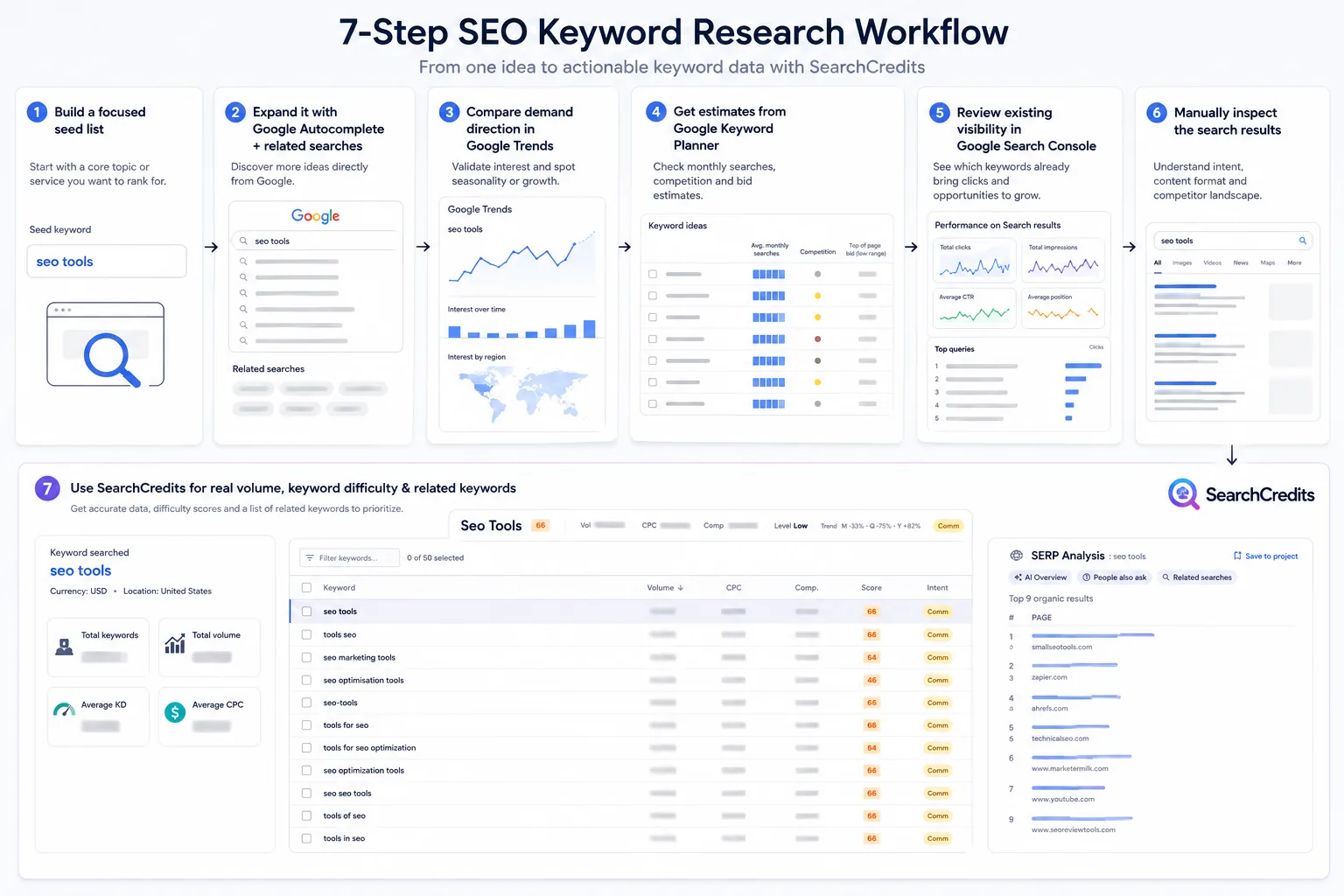
My practical workflow has seven parts:
- Build a focused seed list.
- Expand it with Google Autocomplete and related searches.
- Compare demand direction in Google Trends.
- Get estimates and ideas from Google Keyword Planner.
- review existing visibility in Google Search Console.
- Manually inspect the search results.
- Use SearchCredits when I need real search volume, keyword difficulty, or more related and suggested keywords.
The important principle is not “never pay for data.” It is pay for data when it helps you make a better decision, rather than accepting a recurring subscription before you know how often you will use it.
1. Start with a focused seed list
I begin with the customer’s problem, not a giant export of loosely related keywords.
For each product, service, or article topic, I write down a small set of phrases covering:
- What the customer calls the problem
- The outcome they want
- The product or service category
- Common alternatives
- Questions asked before buying
- Objections or concerns
- Use cases by audience, industry, or situation
The goal is not to make the list comprehensive. Seed terms are starting points for discovering how people phrase related searches. I keep each term tied to a real page or business objective and remove it if I cannot explain what I would create or why a relevant visitor would care.
2. Expand ideas with free Google search features
Google’s own search interface is one of the fastest ways to discover useful variations.
Google Autocomplete
I type each seed term into Google and note the suggestions that appear. Then I vary the phrase by adding modifiers such as:
- how
- best
- alternative
- for
- without
- vs
- pricing
- free
- beginner
Autocomplete is useful for language discovery. It can reveal wording I would not have chosen myself, especially question formats and audience-specific variations.
I do not treat the order of suggestions as a dependable volume ranking. I use Autocomplete to generate ideas, then validate the strongest candidates elsewhere.
Related searches
I also check the related searches shown on the results page. These can expose adjacent problems, comparisons, and alternative terminology.
A search for “keyword research without subscription,” for example, may lead me toward broader themes such as free keyword research, affordable SEO tools, or pay-as-you-go keyword data. Not every related phrase belongs in the same article, but it can suggest supporting sections or separate pages.
3. Use Google Trends for direction, not volume
Google Trends is helpful when I want to compare the relative direction of two terms or see whether interest appears seasonal.
I use it to answer questions such as:
- Is one phrase gaining relative interest while another is declining?
- Does interest rise during a particular part of the year?
- Which of two close terms appears more prominent in the selected market?
- Is a topic steady enough to justify an evergreen page?
The limitation matters: Google Trends shows relative interest, not absolute search volume. A line moving upward does not tell me exactly how many searches a keyword receives. It is a directional signal, not a replacement for volume data.
4. Get estimates from Google Keyword Planner
Google Keyword Planner can generate keyword ideas and monthly search estimates. It is a useful free route when I need more structure than Autocomplete and related searches provide.
However, Keyword Planner is built for advertisers. Its estimates and interface are designed around paid-search planning rather than purely organic SEO research.
Access also requires Google Ads account setup and billing information. That does not make it a conventional monthly SEO subscription, but it is still more setup than simply opening Google Search.
I use Keyword Planner to:
- Expand a seed topic
- Compare broad demand across related terms
- Identify commercial wording
- Find variations worth checking in the search results
I treat its figures as estimates rather than exact guarantees. If a content decision depends on a more specific volume or keyword difficulty metric, I validate the shortlisted terms using pay-as-you-go data.
5. Use Search Console for keywords you already touch
If a site already receives impressions from Google, the Search Console performance report can be extremely useful.
I look for:
- Queries with impressions but few clicks
- Terms ranking close enough to improve
- Unexpected queries associated with an existing page
- Several similar queries that reveal the true topic Google associates with a page
- Pages that may need a better title, clearer answer, or expanded section
Search Console is especially valuable because the queries are connected to the site’s actual search visibility.
Its limitation is equally important: Search Console only reports queries where the existing site appeared. It is not a complete market-wide keyword database. A new site, a new topic, or a category where the site has no visibility may provide little or no useful query data.
That means I use Search Console for optimization and expansion, not as my only discovery source.
6. Manually inspect the search results
Before selecting a keyword, I search it and inspect the results myself.
I want to understand:
- What type of page Google appears to favor
- Whether the results are guides, product pages, comparisons, category pages, or forums
- Whether the query has informational or commercial intent
- How specifically the top pages answer the query
- Whether I can offer a meaningfully better or more focused answer
- Whether my planned page fits what the searcher appears to want
This step prevents a common mistake: choosing a keyword because its wording looks relevant while ignoring the intent visible in the results.
Manual SERP analysis does not produce a stable keyword difficulty score. Two people can review the same results and judge competitiveness differently. The results can also change by location, time, and search context.
Still, no numeric score replaces looking at the pages you would actually need to compete with.
Free and pay-as-you-go options compared
| Method | Best for | What you get | Main limitation |
|---|---|---|---|
| Google Autocomplete | Finding natural phrasing | Suggested query ideas | No dependable volume or difficulty metric |
| Related searches | Discovering adjacent topics | Related concepts and variations | Relevance varies by query |
| Google Trends | Comparing direction and seasonality | Relative interest patterns | Direction only, not absolute volume |
| Google Keyword Planner | Expanding terms and estimating demand | Keyword ideas and monthly search estimates | Built for ads; requires account setup and billing information |
| Google Search Console | Improving existing visibility | Queries where your site appeared | Cannot reveal the whole market |
| Manual SERP review | Understanding intent and competition | Real result types and content patterns | No stable difficulty score |
| SearchCredits | Validating shortlisted keywords on demand | Real volume, keyword difficulty, and related or suggested keywords | Uses credits, so unnecessary lookups still cost money |
7. Add pay-as-you-go metrics with SearchCredits
The free workflow can take me a long way, but it leaves two recurring gaps: dependable volume data and a consistent keyword difficulty metric.
That is why I built SearchCredits.
SearchCredits provides real search volume and keyword difficulty, plus related and suggested keywords, through its keyword lookup tool. When you want to see which terms a rival ranks for and you do not, the competitor research tool runs a keyword gap on the same credits. The data is aggregated from established third-party SEO data providers.
The model is pay as you go:
- $1 buys 100 credits
- New users receive free signup credits
- Purchased and free credits remain available for 12 months
- There is no large upfront cost required to begin
- An optional $9 membership includes 1,500 credits each month
- Membership credits roll over for about three months, so a quiet month is not wasted
I designed this for people who do not need a traditional SEO subscription every month. A freelancer might research keywords for a client project, pause for several weeks, and return when another project begins. A founder might validate one content cluster without committing to a large annual plan.
My workflow is to use free sources for broad exploration, then spend credits only on the terms that have survived the earlier checks.
For each shortlisted keyword, I ask:
- Does the query match a real customer problem?
- Does the current SERP match the type of page I can create?
- Would volume or difficulty change whether I prioritize it?
- Do related or suggested keywords reveal a better angle?
- Is the opportunity relevant enough to justify the content effort?
This keeps credit use focused. I am not buying metrics for hundreds of ideas I will never publish.
If you are comparing broader platforms, read our guide to an Ahrefs alternative. Freelancers can also see our practical list of SEO tools for freelancers.
A simple repeatable workflow
Here is the complete process I recommend:
- Choose one business problem or page objective.
- Write a focused seed list using customer language.
- Expand it with Google Autocomplete and related searches.
- Use Google Trends when direction or seasonality affects the decision.
- Check Google Keyword Planner for ideas and monthly search estimates.
- Review Search Console for queries where an existing site already appears.
- Search each serious candidate and identify the dominant intent.
- Remove terms that do not fit the page you can realistically create.
- Use SearchCredits for real volume, keyword difficulty, and related or suggested keywords.
- Prioritize the terms with the best combination of relevance, intent fit, and realistic opportunity.
This process is slower than exporting thousands of keywords from an all-in-one platform. I consider that a feature for smaller teams: it encourages deliberate choices instead of producing a large list that nobody reviews.
Frequently asked questions
Can I do keyword research without paying monthly?
Yes. Google Autocomplete, related searches, Trends, Keyword Planner, Search Console, and manual SERP inspection can support a substantial workflow without a monthly SEO subscription. When free sources leave important gaps, pay-as-you-go credits can provide metrics without requiring a recurring plan.
Is Google Keyword Planner enough for SEO?
It can help with keyword ideas and monthly search estimates, but it was built for advertising. I combine it with manual SERP analysis and, when needed, dedicated volume and keyword difficulty data.
Does Google Trends show search volume?
No. Google Trends shows relative interest and direction rather than absolute search volume. Use it to compare terms or identify patterns, not to claim an exact number of searches.
Can Search Console find keywords for a new website?
Usually not by itself. Search Console reports queries where your site appeared, so a new site or an entirely new topic may have limited data. Use discovery methods such as Autocomplete, related searches, Keyword Planner, and SearchCredits alongside it.
Do I need a keyword difficulty score?
Not for every idea. Manual SERP review can eliminate obviously poor matches. A difficulty score becomes more useful when you are comparing several relevant keywords and need a consistent prioritization signal.
Is SearchCredits a subscription?
The core model is pay as you go: $1 buys 100 credits, and purchased or free credits remain available for 12 months. There is also an optional $9 membership that includes 1,500 credits a month, and unused credits roll over for about three months. See pricing for the full breakdown.