Local SEO Tools for Small Businesses That Actually Work
Local SEO tools for small businesses, explained plainly: what a free Google Business Profile does, and how to check where you actually rank in the map pack.
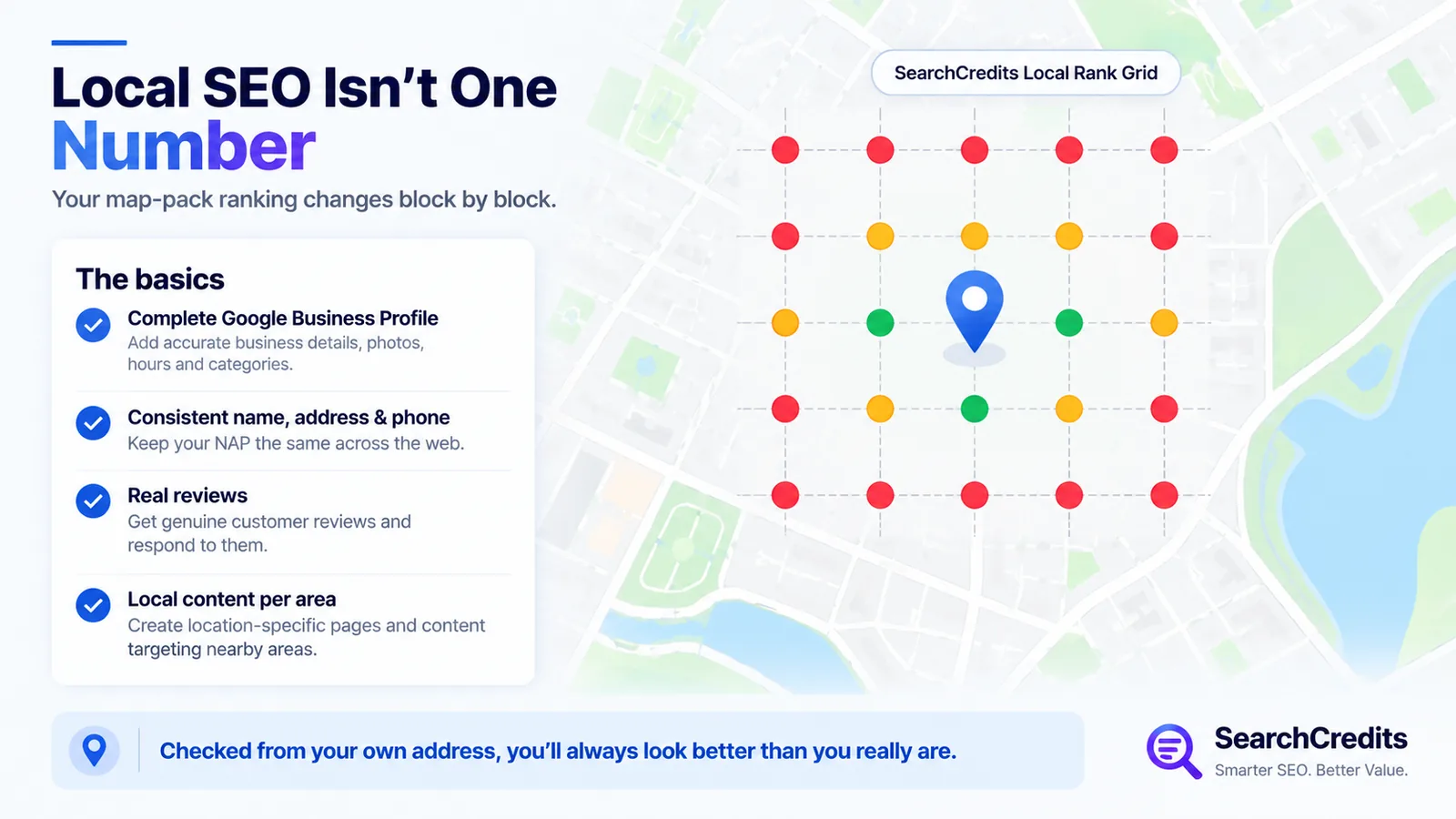
Local SEO for a small business comes down to a short list of things: a complete Google Business Profile, consistent name, address and phone details across the web, real reviews, and content built around the areas you actually serve. Get those right and most of the work is done. The main job left for a tool is telling you the truth about where you rank in the map pack, because your own phone will almost always show your business closer to the top than a real customer sees it.
What local SEO for a business actually means
Google says local ranking comes down to three factors: relevance (how well your profile matches the search), distance (how far the searcher is from you), and prominence (how well known your business is, based on things like reviews and links). That’s from Google’s own guidance, not a guess, and it explains why two searchers standing a mile apart can see completely different results for the same query.
That last point matters more than most small business owners realize. If you search your own business name from your own office, you’ll rank first almost every time. That tells you nothing about how you look to a customer three miles away, which is usually the search that actually brings in new business.
The core local SEO tasks
A Google Business Profile is free and it’s the foundation. Fill in every field: category, hours, service area, photos, attributes, and a real business description. An unclaimed or half-filled profile gives Google less to match you against, and it shows.
Keep your name, address and phone number identical everywhere they appear online, your website, your profile, any directory you’re listed in. Local SEO people call these matching listings “citations,” and inconsistent ones (a missing suite number, an old phone line still floating around) quietly work against you.
Reviews carry real weight. Ask happy customers directly, respond to what comes in, and don’t let a bad review sit unanswered. Volume and recency both matter, and this is one of the areas Google explicitly lists under prominence.
If you serve more than one town or neighborhood, a page for each one, written for that area rather than duplicated with the city name swapped, helps you show up for “near me” searches you’d otherwise miss.
None of this requires software. It requires doing the work.
Free local SEO tools worth using
Your Google Business Profile dashboard is the first tool, and it’s free. It shows how customers found you, what they searched, and basic performance data.
Google Search Console will show you the local and branded queries already bringing you clicks, which is useful for spotting a neighborhood or service you’re already getting some traction in.
A manual check in Google Maps or an incognito browser window is the free way to spot-check your ranking. It’s also unreliable: search personalization narrows the gap but doesn’t remove it, and checking from one spot tells you nothing about your ranking three streets over.
Where the free tools run out
This is the actual problem with local rank checking: your rank isn’t one number. It changes block by block. A business can sit in the top three near its own address and disappear from the map pack ten minutes’ drive away, and there’s no way to see that by searching from your own desk.
Checking it properly means running the same search from multiple points spread across your service area and recording where you land at each one. That’s tedious to do by hand and it’s exactly what a grid-based rank check automates.
Where SearchCredits fits
SearchCredits’ Local Rank Grid does this: you give it a business and a search term, and it scans a grid of points around that business (5x5, 7x7 or 9x9, with a radius you set between half a kilometer and 20 kilometers) and reports your map-pack position at every single point. Alongside that it pulls a Google Business Profile audit (claimed status, category, hours, photo count, how many profile attributes are filled in, and your Q&A activity) and a review pulse comparing your rating and review count against the competitors actually showing up in your grid, including how far your rating sits from theirs.
A scan costs 30 credits for a 5x5 grid, 50 for 7x7, or 80 for 9x9, which is $0.30 to $0.80 at the standard $1-per-100-credits rate, and it can be scheduled to repeat weekly or monthly if you want to track movement over time rather than run it once. There’s no subscription. You pay for the scan, not for a seat.
Local SEO tools compared
| Tool | Cost | Best for | Main limitation |
|---|---|---|---|
| Google Business Profile | Free | The foundation for any local visibility | Doesn’t show you how you rank away from your own address |
| Google Search Console | Free | Local and branded queries already bringing clicks | No map-pack position data |
| Manual spot checks | Free | A rough gut check | Personalization and your own location skew what you see |
| SearchCredits Local Rank Grid | 30 to 80 credits per scan ($0.30 to $0.80), no subscription | An accurate rank grid plus a profile audit and review comparison | Not a full local SEO platform |
| Whitespark Local Ranking Grids | From $10/month | Ongoing scheduled grid tracking inside a dedicated platform | Recurring cost even in a quiet month |
| BrightLocal | Citation Builder from $2/citation; platform pricing on request | Agencies managing citations and rankings across many locations | Built for volume, more than a single small business usually needs |
A simple local SEO routine
Claim and fully complete your Google Business Profile if you haven’t already. Check your name, address and phone details match across every listing you can find. Ask for reviews after a good job, and reply to the ones you already have. Then run a grid check to see where you actually stand around your service area, not just at your own front door, and check back on it every month or two rather than once and never again.
For the technical side of your website itself, my SEO website audit checklist covers what to check beyond the local-specific work here, and if you’re managing this across several small business clients, SEO tools for freelancers covers how I sequence free and paid tools per project.
Frequently asked questions
What are the best local SEO tools for a small business?
Start with the free ones: a fully completed Google Business Profile and Google Search Console. For checking your actual map-pack position across your service area rather than just at your own address, a grid-based rank checker like SearchCredits’ Local Rank Grid fills the gap free tools can’t.
How much does local SEO cost for a small business?
The core work, a Google Business Profile, consistent listings, and asking for reviews, is free. Paid tools come in once you want to measure results: a single rank-grid scan through SearchCredits runs $0.30 to $0.80, while dedicated local SEO platforms like Whitespark or BrightLocal charge a recurring monthly fee.
Why does my business rank differently depending on where I search from?
Google weighs distance heavily in local results, so a searcher’s location changes what they see. Searching from your own office almost always shows your business ranking better than it does elsewhere in your service area, which is why a single search from your desk isn’t a reliable way to check your ranking.
What’s the difference between local SEO and regular SEO?
Regular SEO targets ranking in standard search results for people anywhere. Local SEO targets the map pack and “near me” style searches, where distance from the searcher and signals like your Google Business Profile and reviews carry far more weight than they do in general organic rankings.
Do I need a subscription tool for local SEO, or can I do it for free?
Most small businesses can run the core work for free: Google Business Profile, Search Console, and manually requesting reviews. A paid tool becomes worth it once you want an accurate picture of your map-pack ranking across your whole service area, which free spot checks can’t reliably show you. A pay-as-you-go option covers that without committing to a monthly platform.