SEO Website Audit: A Step-by-Step Checklist
An SEO website audit checklist: the crawlability, on-page, speed and technical checks that move rankings, and how to run them without a costly subscription.
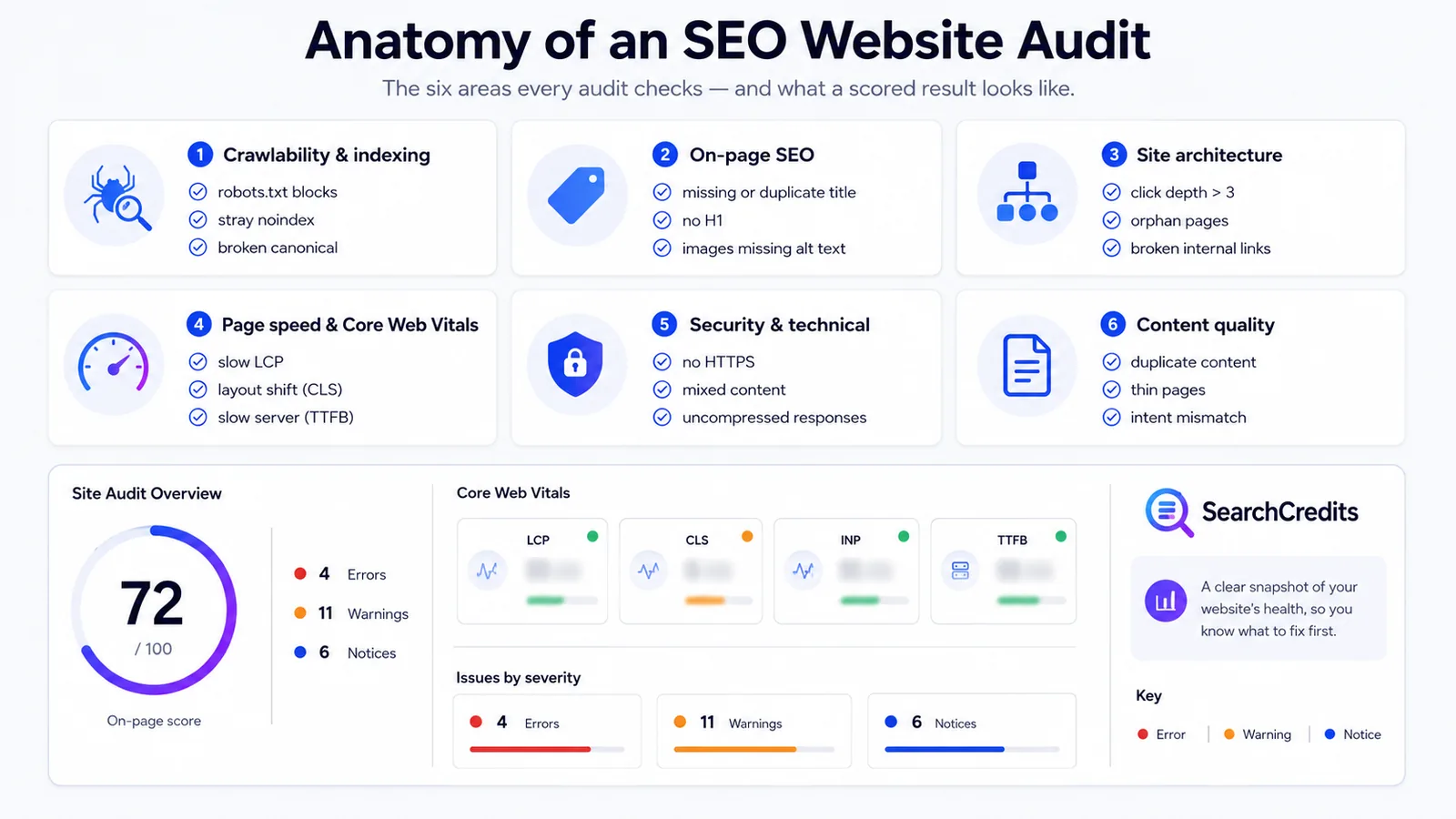
An SEO website audit is a structured check of everything that decides whether Google can crawl your site, index the right pages, and rank them. A useful audit covers six areas: crawlability and indexing, on-page SEO, site architecture, page speed, security and technical hygiene, and content quality. You can run a solid version of all six with free tools plus a small amount of paid crawl data; you do not need a $100-plus monthly platform.
This is the checklist I use, in the order I work through it, with the specific things to look for and where to find them.
What an SEO website audit checks
Every audit tool organises its findings slightly differently, but the substance is the same. These are the six buckets and the questions each one answers.
| Area | The question it answers | Typical problems |
|---|---|---|
| Crawlability & indexing | Can Google reach and index the pages you want ranked? | Blocked by robots.txt, noindex left on, orphan pages, redirect chains, broken canonicals |
| On-page SEO | Does each page clearly signal its topic? | Missing or duplicate titles, no H1, thin meta descriptions, images with no alt text |
| Site architecture | Can users and crawlers move through the site efficiently? | Deep pages, weak internal linking, broken internal links, no XML sitemap |
| Page speed & Core Web Vitals | Does the page load fast and stay stable? | Slow server response, render-blocking scripts, layout shift, oversized images |
| Security & technical | Is the site served cleanly and safely? | No HTTPS, mixed content, missing doctype, uncompressed responses |
| Content quality | Is the content worth ranking? | Duplicate content, very thin pages, keyword cannibalisation, outdated information |
If you fix nothing else, fix the first row. A page that Google cannot crawl or is told not to index will never rank, no matter how good it is.
Before you start: three things to set up
- Google Search Console: verify the site if it is not already. This is your source of truth for what Google has actually indexed and which queries the site appears for. It is free.
- A crawler. The free tier of Screaming Frog SEO Spider crawls up to 500 URLs, which covers most small sites. For larger sites, or if you would rather not install desktop software, a hosted crawler does the same job.
- A page-speed tool. PageSpeed Insights runs Google Lighthouse against a single URL and reports Core Web Vitals using real-world field data where it exists.
With those three in place, work through the checklist below.
The SEO website audit checklist
1. Crawlability and indexing
- robots.txt. Open
yourdomain.com/robots.txtand confirm you are not blocking anything important. A strayDisallow: /on a staging config that shipped to production is a classic. Google’s robots.txt guide explains the syntax. noindextags. Crawl the site and check fornoindexon pages that should rank. It is common to launch a section withnoindexand forget to remove it. How to control indexing.- Index coverage. In Search Console, review the Pages report. Look for pages “Crawled: currently not indexed” and “Discovered: currently not indexed”; those usually signal thin content or a crawl-budget problem.
- Canonical tags. Every indexable page should have a self-referencing canonical, or point to the version you want indexed. Flag canonicals that point to a redirect, a 404, or loop back on themselves. Consolidate duplicate URLs.
- Redirects. Single 301s are fine. Redirect chains (A → B → C) waste crawl budget and dilute link equity; point the first link straight at the destination.
- XML sitemap. Confirm one exists, is referenced in robots.txt, contains only indexable 200-status URLs, and is submitted in Search Console. Sitemaps overview.
2. On-page SEO
- Title tags. Every page needs a unique title, roughly 50 to 60 characters, with the primary term near the front. Flag missing, duplicated, and truncated titles.
- Meta descriptions. Not a ranking factor, but they affect click-through. Flag missing and duplicated descriptions on pages that matter.
- One H1 per page. It should describe the page. Missing H1s and multiple H1s both get flagged by most audit tools.
- Image alt text. Images that carry meaning need descriptive alt text, for accessibility and image search.
- Heading structure. Headings should form a logical outline (H2s under the H1, H3s under H2s), not be chosen for styling.
If you find a lot of pages targeting overlapping terms, that is keyword cannibalisation. My guide to keyword research without a subscription covers how to map one primary keyword to one page.
3. Site architecture and internal links
- Click depth. Important pages should be reachable within three clicks of the home page. A crawler reports the depth of every URL.
- Internal links. Key pages should have internal links pointing at them with descriptive anchor text. Pages with only one or two internal links are under-supported.
- Orphan pages. Pages in your sitemap or analytics that the crawler never reached from an internal link. Either link to them or remove them.
- Broken internal links. Every internal 404 is a dead end for a user and a crawler. Fix the link or restore the page.
4. Page speed and Core Web Vitals
Test representative templates (home, a listing page, a product or article page) rather than every URL. You are looking for template-level problems, not one slow page.
- Largest Contentful Paint (LCP). The main content should render within about 2.5 seconds. Usual causes: slow server response, render-blocking CSS/JS, unoptimised hero images.
- Cumulative Layout Shift (CLS). Content should not jump around as it loads. Usual causes: images and ads without reserved space, late-loading fonts.
- Interaction to Next Paint (INP). The page should respond quickly to taps and clicks. Usual cause: heavy JavaScript on the main thread.
- Server response time (TTFB). A high time-to-first-byte points at hosting, caching, or backend work before speed optimisation on the page itself will help.
Core Web Vitals are a real but modest ranking input; treat them as a tie-breaker and a user-experience issue, not the main event.
5. Security and technical hygiene
- HTTPS everywhere. The whole site should be served over HTTPS, and HTTP URLs should 301 to HTTPS. Google has treated HTTPS as a ranking signal since 2014.
- Mixed content. An HTTPS page that loads an image or script over HTTP. Browsers flag it and it undermines the secure padlock.
- Mobile rendering. Google indexes the mobile version of your site. Check that content, links, and structured data are present in the mobile render, not just desktop.
- Compression and caching. Responses should be gzip- or Brotli-compressed, with sensible cache headers on static assets.
- Structured data. If you use schema markup, validate it. Invalid markup can lose you rich results. Structured data basics.
6. Content quality
- Duplicate content. Near-identical pages competing with each other. Consolidate, canonicalise, or differentiate them.
- Thin pages. Pages with very little unique content. Improve them, merge them, or remove them.
- Outdated content. Pages with stale dates, dead references, or superseded advice. A refresh often recovers lost rankings faster than a new page.
- Search intent match. For your priority keywords, does the page type match what already ranks? A category page will not rank for a query where Google shows how-to articles.
How to run the audit without an expensive subscription
Here is the stack I actually use.
Free layer. Search Console for index coverage and query data, the free Screaming Frog tier for crawls up to 500 URLs, and PageSpeed Insights for Core Web Vitals. For a small site, this covers most of the checklist.
Paid-when-you-need-it layer. The free layer has two gaps: crawling a site larger than 500 URLs, and getting a scored, prioritised issues list without interpreting a raw export by hand. That is where the SearchCredits site audit fits. It is pay-as-you-go: $1 buys 100 credits, and every action shows its cost before you run it, so an audit is a known one-off spend rather than a subscription.
Its Site Audit has two modes:
- Single page (3 credits): an on-page score, Core Web Vitals via Google Lighthouse, and every technical issue grouped by severity (errors, warnings, notices) across crawlability, on-page SEO, performance, and security. It also lists the specific speed opportunities with an estimated time saving for each, and a page snapshot: title and description length, H1, word count, link counts, and image and script weight. Run it as mobile or desktop.
- Full site (20 credits for 100 pages, or 65 with JavaScript rendering for React/Vue sites; the cost scales with the page count you pick): crawls up to 1,000 pages, respecting your sitemap. You get a site-wide score, every recurring issue with the exact list of affected URLs, and a pages table sorted worst-first with each page’s score, click depth, and indexable status. It also reports duplicate titles, descriptions and content, broken links and resources, and non-indexable pages, alongside an Ahrefs-style domain overview: referring domains, a domain authority score, and an organic traffic estimate.
Underlying crawl and metric data is aggregated from established third-party SEO data providers. New accounts get free starter credits and purchased credits last 12 months, so you can audit a site now and re-check it after fixes without a second purchase.
Full-platform layer. If you audit multiple sites every week and want scheduled re-crawls, change tracking, and integrated reporting, a subscription tool like Ahrefs or Semrush earns its cost. Below that level of use, it usually does not.
SEO audit tools compared
| Approach | Cost | Best for | Main limitation |
|---|---|---|---|
| Search Console + manual checks | Free | Index coverage, query data, your own site | No full crawl; a lot of manual interpretation |
| Screaming Frog free tier | Free, up to 500 URLs | Small-site technical crawls | 500-URL cap; you prioritise the findings yourself |
| SearchCredits Site Audit | $0.03 per page / $0.20 per 100-page crawl | An occasional scored audit without a subscription | Not built for continuous monitoring across many sites |
| Ahrefs / Semrush Site Audit | From ~$129 to $139/month | Weekly audits across many sites, scheduled re-crawls | Expensive if you only audit occasionally |
For a fuller breakdown of the lower-commitment options, see my post on SEO tools for freelancers.
How often should you audit?
- Full audit: once a quarter for an active site, or before and after any major change (redesign, migration, CMS switch).
- Crawl for broken links and new
noindex/redirect issues: monthly. - Core Web Vitals and index coverage in Search Console: check monthly; investigate immediately if either drops sharply.
A migration deserves an audit on both sides: crawl and record the old site first, then crawl the new one and reconcile every URL.
Frequently asked questions
What is an SEO website audit?
It is a structured review of the technical and on-page factors that affect how a site is crawled, indexed, and ranked by search engines. A complete audit covers crawlability and indexing, on-page SEO, site architecture, page speed and Core Web Vitals, security and technical hygiene, and content quality, and ends with a prioritised list of fixes.
How do I do an SEO audit for free?
Verify the site in Google Search Console and review its Pages and Core Web Vitals reports, crawl the site with the free tier of Screaming Frog (up to 500 URLs), and run key templates through PageSpeed Insights. That covers most of the checklist for a small site. Paid crawl data helps once the site is larger than 500 URLs or you want a scored issues list rather than a raw export.
How long does a website audit take?
A single-page check takes a minute or two. A full-site crawl runs in a few minutes and takes an hour or two to interpret. A thorough manual audit with written recommendations is usually half a day to a full day.
What is the difference between a single-page audit and a full-site crawl?
A single-page audit inspects one URL in depth: its score, speed metrics, and every on-page and technical issue. A full-site crawl visits many pages to find recurring problems: duplicate titles across templates, broken internal links, redirect chains, and pages that are deep or non-indexable. You need both: the crawl finds the pattern, the single-page audit confirms the detail.
Do Core Web Vitals really affect rankings?
Yes, but modestly. Google uses them as part of its page-experience signals, which act more like a tie-breaker between pages of similar relevance than a primary ranking factor. Fix them for users first; the ranking benefit is a bonus.
Can I audit a website without a paid subscription?
Yes. Google’s free tools plus a free crawler cover most of a small-site audit. For larger sites or a faster, scored result, pay-as-you-go tools such as SearchCredits let you run one audit for a fixed credit cost instead of committing to a monthly platform.