Small SEO Tools: A Lightweight Toolkit for Real SEO Work
Small SEO tools (lightweight, often free tools that each do one job well) cover more real SEO work than you'd expect. Here's the toolkit, and when to upgrade.
“Small SEO tools” here means focused, lightweight tools that each do one or two jobs well, instead of one large platform trying to do everything. Most of them are free or cost pennies per use. For day-to-day SEO work (checking a keyword, auditing a page, tracking a handful of rankings), a small toolkit covers more than people expect, and you only need something heavier once your usage becomes genuinely daily and broad.
What makes a tool “small”
| Trait | Small tool | All-in-one suite |
|---|---|---|
| Scope | One or two jobs, done well | Dozens of features in one dashboard |
| Cost | Free, or pay only for what you use | Fixed monthly subscription |
| Setup | Open it and use it | Account, onboarding, a learning curve |
| Data depth | Enough for the specific question | Broad and deep across many features |
| Best for | Occasional, targeted checks | Daily, heavy, cross-functional use |
Neither category is “better” in the abstract. A small SEO tool that answers one question accurately beats a bloated dashboard you barely open. A suite earns its subscription once you’re inside it every day.
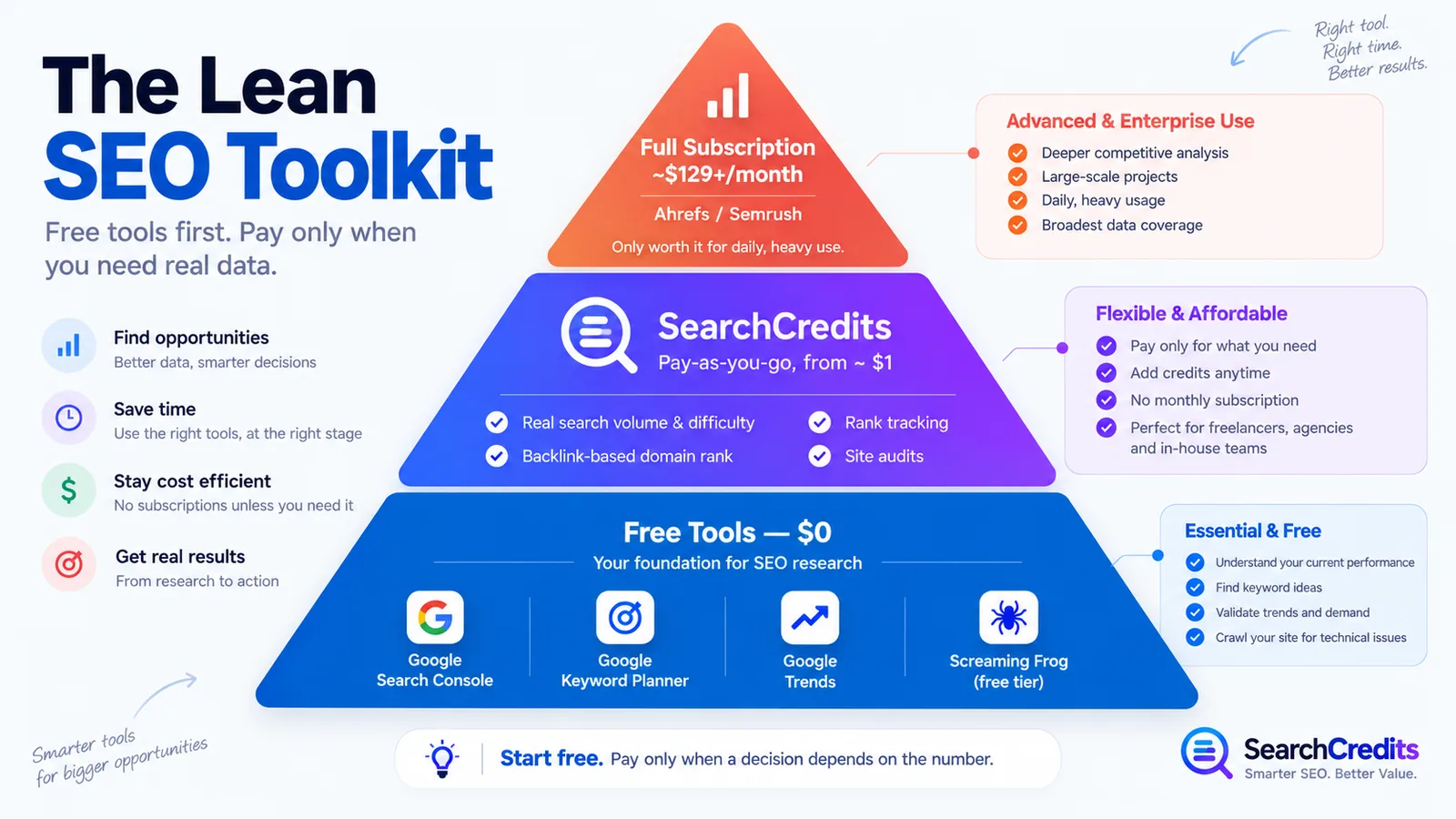
The small SEO toolkit I actually use
Google Search Console: free, and the closest thing to ground truth about your own site: which queries you show up for, what’s indexed, and what Google flags as an error. Nothing replaces first-party data about your own site.
Google Keyword Planner: free keyword ideas and ad-planning estimates. Built for advertisers, so treat its competition metric as ad competition, not organic ranking difficulty, but it’s a fast way to expand a seed list.
Google Trends: free, relative demand over time. Useful for spotting seasonality and direction; not a substitute for an actual monthly search volume.
Screaming Frog SEO Spider, free tier: a real crawler, free for up to 500 URLs. Small sites get a full technical crawl for nothing; my SEO website audit checklist walks through what to look for once you’ve run it.
SearchCredits: pay-as-you-go, not a subscription. $1 buys 100 credits and every action shows its cost before you run it. It’s the small tool that fills the one gap the free layer can’t: actual search volume and keyword difficulty, a backlink-based domain rank, ranked-keyword and competitor-gap data, and a scored site audit with the specific issues listed, for a few cents a lookup rather than a monthly commitment. New accounts start with free credits, and purchased credits last 12 months.
That’s five small SEO tools, none of them a subscription, and together they cover keyword research, technical audits, and rank checks for most sites.
When a small toolkit is enough, and when it isn’t
Enough when: you’re researching occasionally, managing one or a few sites, working to a tight budget, or you don’t need scheduled monitoring and integrated reporting across a team.
Not enough when: you’re doing this daily across many sites or clients, you need automatic re-crawls and change tracking, or a team needs shared dashboards and permissions. At that point the time a full suite saves is worth more than its subscription; see my breakdown of Ahrefs alternatives for where that line usually sits.
Small SEO tools, compared side by side
| Tool | Cost | Best for | Main limitation |
|---|---|---|---|
| Google Search Console | Free | Your own site’s indexing and query data | Not competitor or backlink data |
| Google Keyword Planner | Free | Keyword ideas, ad-planning estimates | Ad competition, not organic difficulty |
| Google Trends | Free | Direction and seasonality | Relative interest, not literal volume |
| Screaming Frog (free tier) | Free, up to 500 URLs | Small-site technical crawls | 500-URL cap |
| SearchCredits | $1 per 100 credits, no subscription | Real search volume, domain rank, rank tracking, site audits | Not built for daily use across many sites |
| Ahrefs / Semrush | From ~$129 to $139/month | Daily, heavy use across many functions at once | Expensive if your usage is occasional |
How to build your own lean stack
- Start with what’s free. Search Console, Keyword Planner, and Trends cover discovery and your own site’s performance at zero cost.
- Add a crawler when you need technical depth. Screaming Frog’s free tier handles most small sites.
- Pay only for the specific data point free tools can’t give you accurately: real volume, difficulty, backlink-based authority, or a scored audit. This is where a pay-as-you-go tool earns its keep over guessing from a free estimate.
- Upgrade to a full suite only once usage is genuinely daily and broad: not “just in case.”
If you’re assembling this stack for client work rather than your own site, my guide to SEO tools for freelancers covers how I sequence it per project. And if the next step is validating keyword ideas without committing to anything, see keyword research without a subscription.
Frequently asked questions
What are “small SEO tools”?
Lightweight, narrowly-scoped tools that each do one job well (a keyword idea generator, a technical crawler, a rank checker) rather than one large platform trying to cover every SEO function. Most are free or cost a small amount per use, with no subscription required.
Are free SEO tools actually good enough?
For a lot of real work, yes. Google’s own tools (Search Console, Keyword Planner, Trends) plus a free crawler like Screaming Frog cover indexing, keyword ideas, direction, and technical audits for a small site. The gap is real search volume, keyword difficulty, and backlink-based authority, data that requires a maintained index behind it, which is why those numbers are usually estimated or capped on free tools.
What’s the best small tool for keyword research specifically?
Start with Google Keyword Planner and Trends for free ideas and direction. When you need an actual search volume and difficulty score to decide between keywords, a pay-as-you-go tool like SearchCredits gives you that for a few cents per lookup instead of a subscription. The same credits also track keyword rankings at 3 credits per keyword, so you can see whether a post is moving without a monthly rank tracker.
Do I need Ahrefs or Semrush, or can small tools work?
Small tools work for occasional, targeted research. Move to a full suite once you’re using it daily across enough sites or clients that the subscription costs less than the time you’d spend combining smaller tools. See my Ahrefs alternative comparison for the fuller breakdown.
How much does a pay-as-you-go tool like SearchCredits cost compared to a subscription?
SearchCredits is $1 for 100 credits, with the cost of each action shown before you run it; a single keyword lookup or page audit runs a few cents. Ahrefs and Semrush start from roughly $129 to $139 a month regardless of how much you use them that month. The pay-as-you-go model is cheaper for occasional use; a subscription is cheaper once your usage is heavy and constant.