Freelance SEO Tools That Cost Dollars, Not Hundreds
How freelancers run keyword research, audits, rank tracking and competitor analysis for clients through SearchCredits, paying per lookup, not a monthly fee.
Freelance SEO work is spiky. One month you need keyword research and a competitor teardown for three proposals, the next month is mostly content edits and calls. An all-in-one subscription bills you the same in both. SearchCredits works the other way: you buy credits, and each lookup costs a set number of them, shown before you run it. The data is the same kind you would pull from a bigger suite, search volume, difficulty, rankings, backlinks, technical issues, so you can deliver the same client work for a fraction of the monthly cost.
Each SearchCredits tool below has its credit cost and where it fits in a client project.
Why tool pricing is hard for a freelancer
A full SEO platform is good value for a team that uses it every day. The problem for a freelancer is utilization. You might buy a subscription for one client audit, use it hard for four days, and barely touch it for the rest of the month. The tool is fine. The economics are not.
That pressure gets worse with a small or uneven client roster, because you end up building the subscription cost into every retainer or eating it on smaller projects. My post on SEO tools for freelancers covers the full case for a lean stack. This one is about what SearchCredits specifically replaces.
How the pricing works
One dollar buys 100 credits. Every action shows its credit cost before you run it, so there are no surprises. New accounts get free credits to try the workflow first.
Purchased and free credits stay valid for 12 months, which matters for freelance work: you can buy a batch now and spend it across projects that land weeks apart, instead of forcing all your usage into one billing month. Larger top-ups carry a bonus, from 10% at $25 up to 35% at $200.
There is an optional $9 a month membership that includes 1,500 credits a month, and unused credits roll over for about three months. It only makes sense if your usage is steady. If it isn’t, pay as you go and skip it.
The tools, and how each fits client work
Keyword research
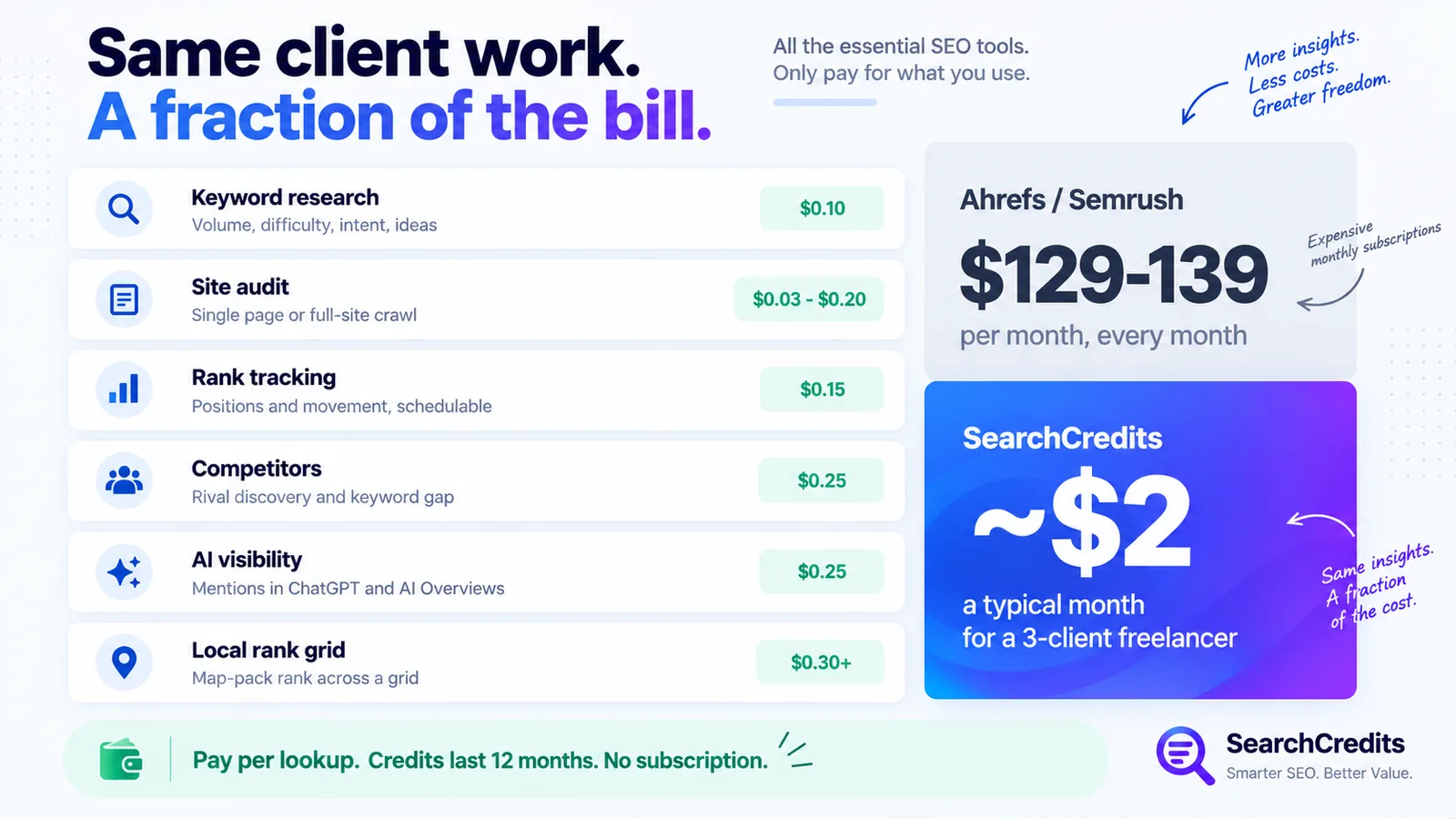
Ten credits ($0.10) returns search volume, keyword difficulty, CPC, search intent, a 12-month trend, the top competitors ranking for the term, related searches, and a full list of keyword ideas. There is an optional worldwide volume breakdown by country for another 50 credits. The keyword research tool page shows a sample of the output.
For client work this covers content briefs, proposal scoping, and deciding which terms are realistic for a site to target. My guide to keyword research without a subscription shows how to narrow a big list down before you spend anything.
Site audit
A single-page audit costs 3 credits ($0.03) and returns an on-page score, Core Web Vitals from Google Lighthouse, and every technical issue sorted by severity. A full-site crawl of 100 pages is 20 credits ($0.20), or 65 with JavaScript rendering for React and Vue sites, and the cost scales with the page count you pick. The site audit crawl lists recurring issues with the exact pages affected, sorts pages worst-first, and includes a domain overview with backlinks and organic traffic.
Run the single-page check during a sales call, run the full crawl during onboarding, and hand the client a prioritised fix list. The SEO website audit checklist covers what to look for in the results.
Rank tracking
A one-off pull of every keyword a domain ranks for, with position, month-over-month movement, estimated traffic, and the ranking URL, costs 15 credits ($0.15). Checking a hand-picked keyword list live costs 3 credits per keyword. Both can be scheduled to run weekly or monthly, which is how you produce a recurring client report without paying for a tracker that runs whether you need it that month or not.
Competitors
Rival discovery plus a head-to-head overview costs 25 credits ($0.25). A keyword gap table, showing what a competitor ranks for that your client doesn’t, is 10 credits, and a rival’s best pages by traffic is another 10. This is proposal and strategy material: it shows a prospect exactly where they’re losing ground and gives you a content plan to pitch.
AI visibility
For 85 credits ($0.85) the AI visibility check shows how often a brand or domain is mentioned in ChatGPT answers and Google AI Overviews, which sources those answers cite, and the exact questions where it shows up. A citation-gap view costs 35 credits. Few freelancers offer this yet, so it’s a deliverable you can add to a proposal that competitors aren’t quoting on.
Shopping visibility and price watch
For e-commerce clients, shopping visibility (10 credits) shows which sellers appear in Google Shopping for a product search and where the client ranks among them. Price watch (15 credits) tracks a single product’s buy-box winner, the full seller list with prices, listing quality, and review profile.
Local rank grid
For a local business client, this scans a grid of points around the business (5x5, 7x7 or 9x9) and reports the map-pack position at each one, so you can show that the client ranks well near their address and drops off a few miles out. It also pulls a Google Business Profile audit and compares the client’s reviews against the competitors showing up in the grid. A scan costs 30 to 80 credits ($0.30 to $0.80) depending on grid size. The local SEO tools guide explains why a grid beats checking from your own desk.
What a month actually costs
Take a freelancer with three active clients. In one month that might be two keyword research batches (20 credits), a 100-page site audit for each client (60 credits), a monthly scheduled rank check on a 15-keyword list per client (90 credits), and one competitor gap analysis for a proposal (10 credits). That comes to 180 credits, about $1.80, plus whatever you spend validating ideas along the way.
Even at ten times that volume, the bill doesn’t come close to one month of Ahrefs or Semrush, which start at roughly $129 and $139 a month regardless of use.
Every SEO tool builds its own keyword and backlink index, so the exact numbers won’t match Ahrefs or Semrush figure for figure. Treat them as directional and compare within one tool over time, which is the right way to read any of these platforms anyway.
Where a subscription still wins
If you’re inside an SEO tool most working days, across enough clients that the per-lookup costs add up, a flat subscription is simpler and the integrated reporting and scheduled crawls save real time. My Ahrefs alternative comparison covers where that line sits. Below daily use across a full client roster, pay as you go is cheaper and you’re not paying for access you’re not using.
Frequently asked questions
Is SearchCredits enough to run SEO for clients?
For most freelance client work, yes. It covers keyword research, single-page and full-site audits, rank tracking, competitor and keyword-gap analysis, AI visibility, and local rank grids. A dedicated all-in-one platform makes more sense once you’re running that work daily across a large roster and want everything scheduled and reported in one dashboard.
How much does SearchCredits cost for a freelancer per month?
It depends entirely on usage, because you pay per action. As a rough guide, a 100-page site audit is $0.20, a keyword research lookup is $0.10, and a scheduled monthly rank check is 3 credits ($0.03) per keyword. A freelancer with a handful of clients typically spends a few dollars a month, not a few hundred.
Can I use SearchCredits results in client reports?
Yes. Sign in and save research to a project per client. The saved snapshot keeps the numbers from when you ran it, so a report you pull together at the end of the month still shows the figures you based your work on.
Does SearchCredits replace Ahrefs or Semrush for freelance work?
For occasional, per-client research it replaces most of what a freelancer actually uses those tools for. It isn’t trying to match every report and feature of a full suite. If you use one of those platforms every day across many clients, keep it. If you log in a few times a month, pay-as-you-go is the cheaper way to get the same answers.
Is there a free trial?
New accounts get free credits on signup, so you can run real lookups before deciding whether to buy more. There’s no subscription to cancel.